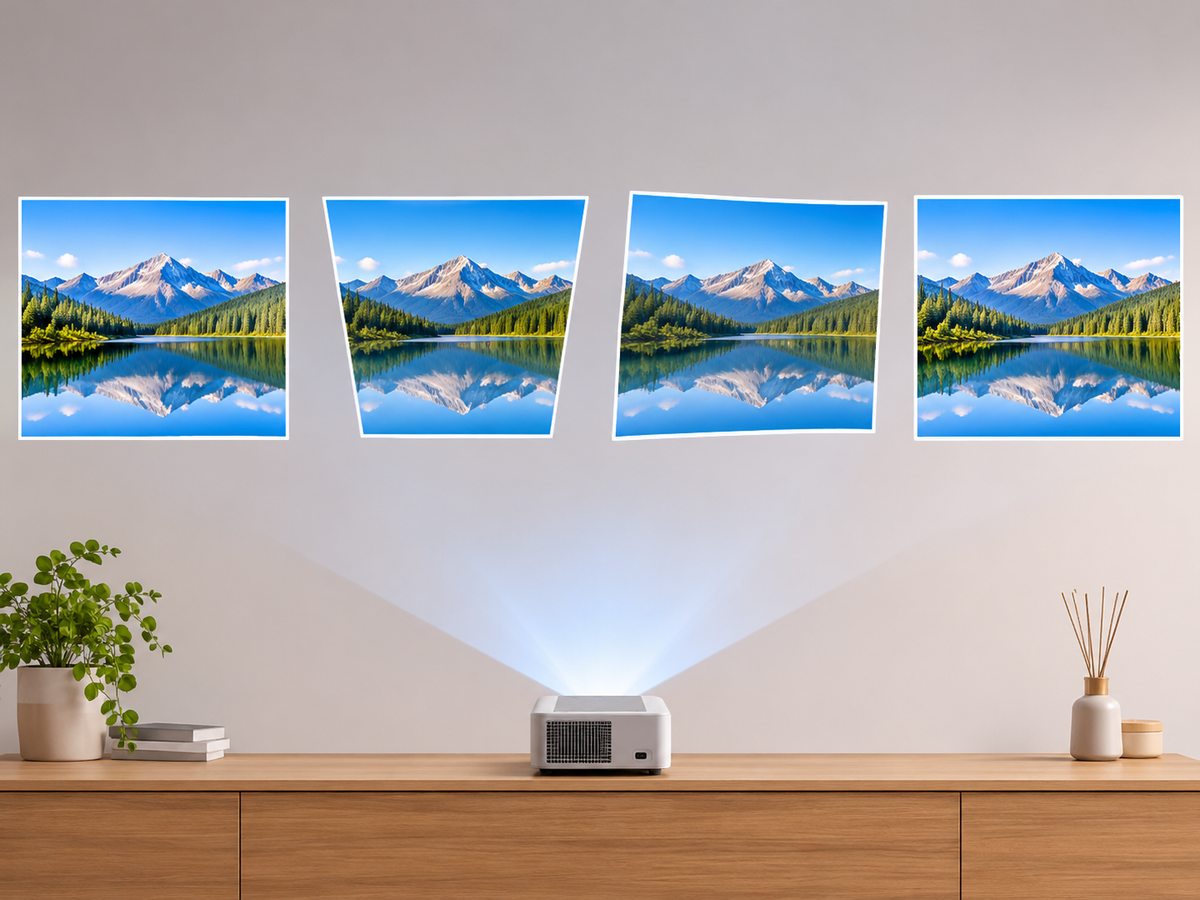

Watching movies on your bedroom ceiling is a simple way to create a more comfortable viewing experience without sitting upright or mounting a large TV on the wall. However, choosing the right projector involves more than image quality. Projection angle, placement, autofocus, keystone correction, mounting options, cooling, and fan noise all affect the experience.
The best projector for bedroom ceiling viewing should support flexible placement, reliable focus adjustment, convenient remote control, and sufficient ventilation. A rotatable projector with autofocus and automatic keystone correction can make setup easier, especially when projecting upward from a bedside table or adjustable stand.
1. Where Should You Place a Projector for Ceiling Viewing?
There are three common ways to position a projector in a bedroom. Each offers different advantages depending on your room layout and viewing habits.
Bedside Table Placement
Placing a projector on a bedside table is one of the easiest solutions. Position it near the head of the bed and angle the lens toward a clear section of the ceiling.
· Advantages: No permanent installation, easy to move, and convenient access to power.
· Limitations: The table must provide enough height and stability. The projection angle may require image correction.
This setup works well for people who want occasional ceiling viewing without modifying their bedroom.
Adjustable Tripod or Projector Stand
A tripod or adjustable projector stand provides more flexibility. You can change the height, direction, and position to align the image with the ceiling.
· Advantages: Flexible positioning and easier adjustment of projection distance.
· Limitations: Check the projector's mounting compatibility and the stand's weight capacity before use.
For bedrooms with limited furniture space, a compact tripod can be a practical alternative to a bedside table.
Ceiling or Wall-Mounted Installation
A fixed ceiling mount can provide a clean and stable setup for regular viewing. However, installation requires checking the projector's mounting points, orientation support, ventilation requirements, and the ceiling's load-bearing capacity.
A permanent installation is best suited to users who have already decided on their preferred screen area and projection distance.
2. Why Projection Angle Matters for Ceiling Viewing
Unlike ordinary wall projection, ceiling viewing usually requires the projector to point upward. The angle between the projector lens and the ceiling affects image geometry and focus.
Upward Projection
An upward-facing projector can display an image directly above the bed. Some portable projectors feature a rotatable body, allowing users to adjust the projection direction without repositioning the entire stand.
Before choosing a model, check its supported rotation range. A 180-degree rotatable design, for example, offers more positioning flexibility than a fixed-angle projector.
Off-Axis or Side Projection
Placing a projector to one side of the bed may be more convenient, but it can create a trapezoidal image.
Digital keystone correction can compensate for some geometric distortion. However, correction does not physically change the projection angle, and heavy digital correction may reduce the effective image area or resolution.
Whenever possible, position the projector closer to a straight-on alignment with the target area.
3. Autofocus and Auto Keystone: Two Features Worth Considering
Two features can make bedroom ceiling projection much easier: autofocus and automatic keystone correction.
|
Feature |
What It Does |
Why It Matters |
|
Autofocus |
Adjusts lens focus automatically |
Helps produce a sharper image after repositioning |
|
Auto keystone correction |
Corrects trapezoidal image distortion |
Helps align the image when the projector is angled |
|
Manual focus |
Allows user-controlled focus adjustment |
Useful for fine-tuning image clarity |
|
Screen adaptation |
Helps adjust the image to a detected screen area, if supported |
Useful when projecting around obstacles or defined boundaries |
These features solve different problems. Autofocus improves sharpness, while keystone correction adjusts image geometry. Neither guarantees perfectly uniform edge focus when the projector is placed at an extreme angle.
For the best results, start with a stable position and a relatively straight projection angle before relying on digital correction.
4. Choosing the Right Mount for Bedroom Ceiling Projection
The mounting method affects convenience, stability, and safety.
· Rotatable projector: Convenient for switching between wall and ceiling viewing. Check the supported rotation range and whether the projector can maintain a stable position.
· Tripod: Offers adjustable height and direction. Confirm that the mounting thread and weight capacity are compatible.
· Ceiling mount: Suitable for permanent setups. Follow the manufacturer's installation instructions and verify that the mount supports the projector's weight and orientation.
Always secure the projector properly. Never place a projector loosely above the bed or use an unstable support that could fall during operation.
5. Don't Overlook Cooling and Fan Noise
Bedroom viewing often takes place at night, when environmental noise is lower and the viewer is closer to the projector.
Cooling and ventilation: Projectors generate heat during operation. Keep air intake and exhaust vents unobstructed, maintain the manufacturer's recommended clearance, and avoid covering the projector with bedding or placing it in an enclosed space.
Fan noise: A projector that sounds acceptable in a living room may feel more noticeable in a quiet bedroom. Check independent reviews or measured noise levels at a stated distance rather than relying only on marketing descriptions.
Remote control: Convenient remote operation is especially useful when the projector is positioned behind or beside the bed. Check whether you can adjust focus, volume, playback, and other frequently used settings without getting up.
6. What to Look for in a Bedroom Ceiling Projector
Before buying, use this checklist:
|
Buying Factor |
What to Check |
|
Rotation |
Does the projector support upward projection? |
|
Focus |
Does it offer autofocus or manual focus adjustment? |
|
Keystone |
Is automatic or manual correction available? |
|
Mounting |
Is it compatible with a tripod or ceiling mount? |
|
Brightness |
Is it suitable for your bedroom's ambient lighting? |
|
Resolution |
Check native resolution rather than advertised input support |
|
Cooling |
Are ventilation openings easy to keep unobstructed? |
|
Noise |
Are independent operating noise measurements available? |
|
Remote |
Can you conveniently control the projector from bed? |
For a bedroom, native 1080p resolution can be a useful target for sharper movie details. Brightness should also match the room: darker bedrooms generally require less brightness than rooms with significant ambient light.
Explore Magcubic's M800 projector series to compare available projector designs and features. The M800 series includes models with a rotatable design, making it worth considering for flexible bedroom placement. Always check the individual model's specifications before choosing a mounting arrangement.
7. Frequently Asked Questions
Can I use a projector to watch movies on my bedroom ceiling?
Yes. A projector can display movies on a ceiling if it supports the required projection direction and has sufficient focus and image adjustment capabilities. A rotatable projector or a suitable adjustable stand can simplify setup.
Is a 180-degree rotatable projector better for ceiling viewing?
It can be more convenient because it offers greater flexibility when changing projection direction. However, rotation alone does not guarantee autofocus, keystone correction, or uniform edge sharpness. Check each feature separately.
Do I need autofocus for ceiling projection?
Autofocus is helpful, especially if you frequently change the projector's position. It can reduce manual adjustments, although you may still need to fine-tune focus depending on the projection angle.
Does keystone correction reduce image quality?
Digital keystone correction can reduce the effective image area and may affect fine details, particularly when significant correction is required. Positioning the projector as close to perpendicular to the target surface as possible helps minimize this issue.
Can I mount a projector directly above my bed?
Only if the projector and mounting system support the intended orientation and the installation is secure. Check weight capacity, mounting compatibility, ventilation, and manufacturer instructions before installation.
How can I reduce projector noise at night?
Keep ventilation unobstructed, place the projector on a stable surface, and compare independent noise measurements. Avoid blocking cooling vents or placing the projector too close to your head.
Is a tripod or ceiling mount better?
A tripod is better for flexible, temporary placement, while a ceiling mount is more suitable for a permanent setup. Your choice should depend on room layout, projector compatibility, and installation safety.
Final Thoughts
Choosing a projector for bedroom ceiling viewing is about balancing flexibility, image quality, and everyday comfort. Prioritize a suitable projection angle, reliable focus adjustment, keystone correction, stable mounting, adequate cooling, and manageable fan noise.
For most users, a rotatable portable projector paired with a stable stand is a practical starting point. With the right placement and setup, you can turn an ordinary bedroom ceiling into a comfortable personal movie screen.